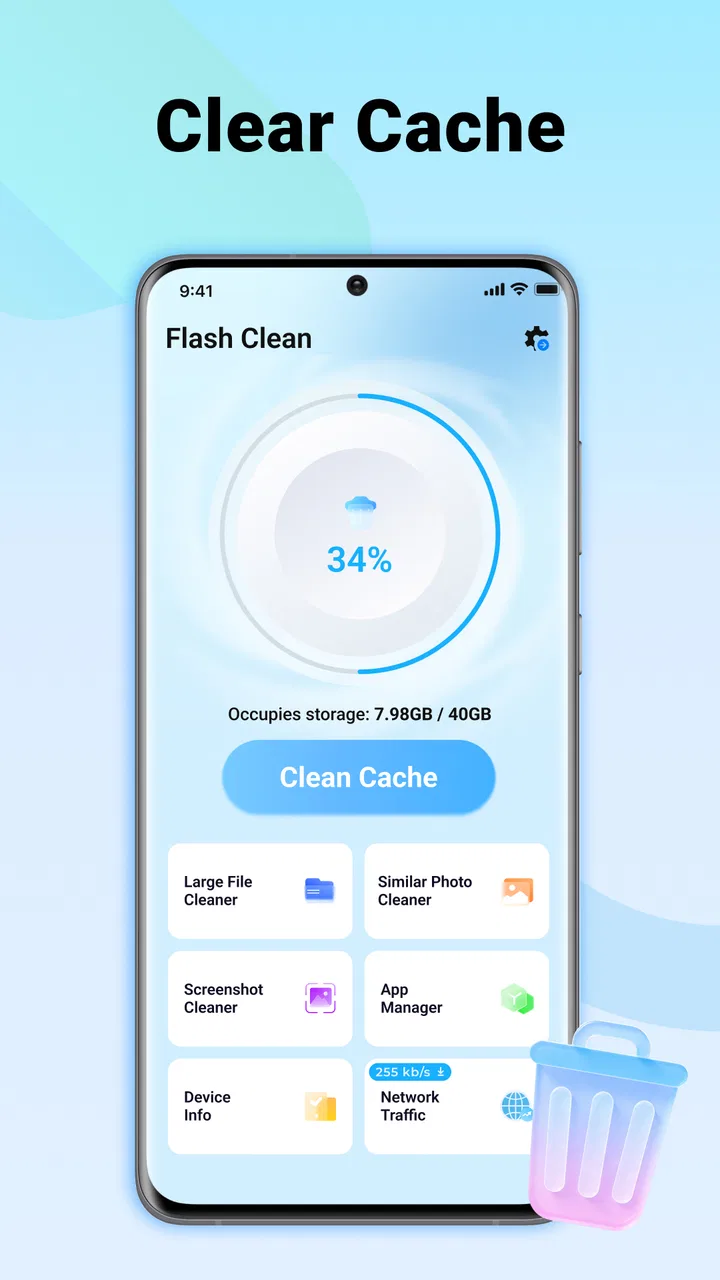
Flash Clean: Storage & Memory
- 4.5
- Rating
- 100.00K
- Installs
- Free
- Price

 Analysis by App-foxy
I installed Flash Clean: Storage & Memory to see whether its one-tap approach actually helps with the small storage problems that build up during everyday phone use. It is a free tools app from FRODO VENTURES LIMITED, aimed at people who want a quick way to look for removable clutter rather than dig through several Android menus. My first impression was that it keeps its purpose very narrow: open it, review what it identifies, and use the cleaning action when the suggested files are genuinely disposable.
That narrow focus is both its appeal and its main limitation. Flash Clean is not trying to replace Android’s complete storage settings, a file manager, or a cloud-backup service. I found it more useful as a repeatable maintenance shortcut than as a rescue tool for every storage problem. If your phone is regularly crowded by temporary files and forgotten downloads, it can make the first step less tedious. If your goal is to understand every folder, move large videos, or manage application data precisely, the system tools remain more suitable.
How I used Flash Clean in a normal storage-maintenance routine
I use Flash Clean as a deliberate checkpoint rather than a button I press whenever the phone feels sluggish. This section follows a normal maintenance pass: first I check what kind of storage pressure I’m dealing with, then I decide whether a quick cleanup is the right next step. That distinction helps keep a convenient shortcut from becoming a substitute for understanding what I actually need to keep.
You May Also Like

 Blood Strike: 2.5 Anniversary
Blood Strike’s Loadouts Turn Every Drop Into a Tactical Gamble
A close look at Blood Strike’s custom loadouts: how fast access to signature weapons reshapes its battle royale rhythm, rewards preparation, and narrows the gap between fights.

 Pandora - Music & Podcasts
Pandora’s Music Is Easy to Start, but Harder to Recover
Pandora’s strength is its low-effort path from a seed to a station. Its weak spot is how much confidence it asks you to place in connection, setup, and quiet recovery.

 8 Ball Pool
 Is Built on Rivalries, Rematches, and Routine
A close look at the rivalries, rematches, shared routines, and unanswered safety questions that turn a quick pool match into a persistent mobile community.

 Samsung Music
’s Quiet Strength Is Playing What You Already Own
Its reach comes less from spectacle than from dependable access to a personal library. That simplicity is both the app’s strongest retention engine and its ceiling.

 AccuWeather: Weather Radar
AccuWeather Review: A Quick, Clear Forecast for Everyday Decisions
For everyday plans, the best forecast is the one you can understand quickly. AccuWeather makes rain timing, radar, and local conditions easy to act on, with a few trade-offs.

 Hill Climb Racing
Why Hill Climb Racing Still Turns Crashes Into One More Run
A tiny car, a bumpy hill and one more upgrade: Hill Climb Racing keeps resurfacing because its simple chaos makes every near-miss feel personal.
More From Our News Desk



Start with a baseline instead of cleaning blindly
My preferred way to use the app is not to tap the cleaning control immediately. I first check how much free space the phone has in Android’s own storage screen, then open Flash Clean and see what it presents for review. That simple comparison matters because a phone can feel slow or cramped for reasons that a junk-file cleaner will not solve. A large camera folder, offline video collection, or messaging archive needs a different solution from temporary leftovers.
Flash Clean works best when I treat its scan as a shortlist, not as an automatic instruction. Before confirming a cleanup, I look at the categories or items shown and ask whether I recently downloaded something intentionally. This is especially important after saving travel documents, installers, school materials, or images that have not yet been copied elsewhere. A fast cleaning app is convenient, but convenience should not replace a quick check.
For a realistic everyday example, imagine a phone used for several weeks of messaging, browsing, and downloading attachments. The owner notices that storage warnings appear just before taking photos. Instead of deleting random images, I would open Flash Clean, inspect the removable clutter it identifies, clear only what is recognizable as disposable, and then return to Android’s storage view. If the space problem remains, I would move on to large videos, duplicate media, or unused applications rather than repeating the same scan.
This workflow gives the app a sensible role. It handles the low-value cleanup that is easy to postpone, while Android’s storage tools handle the decisions that require context. The distinction is useful because a junk cleaner cannot know why every file exists. A file may look unnecessary from a technical perspective but still be important to the person who saved it.
What the one-tap idea gets right
The central strength is reduced friction. Android’s built-in controls are capable, but they can require moving through settings, storage categories, application pages, and file locations. Flash Clean places the maintenance action closer to the beginning of that process. For someone who only wants to reclaim a little room before installing an update or recording a long video, that shorter route is practical.
I also like the psychological benefit of a dedicated cleaning routine. When storage management is buried inside general settings, it is easy to ignore until the phone becomes uncomfortable to use. A focused tool makes the task feel more like a quick habit. I would open it after a period of heavy downloading or before a trip, rather than wait for the operating system to complain.
Still, “one tap” should not be interpreted as “no judgment required.” The safe part of the experience is the review before confirmation. My recommendation is to slow down whenever the phone contains work files, offline maps, family photos, or documents downloaded for later use. The app can simplify the path to cleanup, but the final responsibility remains with the user.
Where it fits beside the usual alternatives
Android’s own storage manager is the better choice when I need a complete picture of what occupies space. It is closer to the operating system and usually gives more direct control over applications, media, and large files. A file manager is better when I want to inspect folders manually, rename items, transfer them, or make a deliberate deletion. Cloud-storage tools are better when the real answer is backing up photos and removing local copies after verifying the backup.
Flash Clean makes more sense between those options. It is less demanding than manual file browsing and more focused than a broad storage-management screen. I see it as a convenient first pass for removable clutter, not a replacement for the tools that explain where the majority of a phone’s storage has gone. That trade-off should guide the download decision: convenience matters most when the task is routine and low risk.
Settings and permissions deserve attention
Because this is a storage-related utility, I would read every system prompt rather than approving access automatically. A cleaning tool needs a way to inspect relevant files or storage areas, and the usefulness of its results depends on what Android allows it to see. The exact prompts can vary by device and operating-system implementation, so I would verify that the requested access matches the action I intend to use.
After installation, I would also check Android’s app settings to understand its notification behavior and storage usage. This is not because the app needs complicated configuration, but because experienced users benefit from keeping maintenance tools quiet and intentional. If I only want occasional manual cleanup, I would avoid turning a simple utility into another source of interruptions.
The app supports devices running Android 8.0 or later, which covers a wide range of phones while still making the operating-system requirement worth checking before installation. On an older device, I would pay extra attention to how clearly the scan results are presented and whether the phone’s own storage screen gives a more useful answer. The app is free, so trying it is straightforward, but free installation does not remove the need to review permissions and deletion choices.
Small habits that make the shortcut more useful
The most effective pattern I found is to clean after a known burst of activity rather than at random. For example, after returning from a trip, finishing a large file-transfer task, or downloading several media attachments, I can use Flash Clean as a checkpoint. This makes the scan easier to interpret because I already know what kind of temporary clutter may have accumulated.
A second useful habit is to separate clutter cleanup from personal-file organization. I would use Flash Clean for the former, then handle photos, videos, and documents with the appropriate app. Mixing both tasks encourages rushed decisions. A cleaner can help remove disposable residue, but it is not automatically the right place to curate a photo library or archive important records.
A third habit is to compare the result with the phone’s available-space indicator after cleaning. I would not assume that every suggested item produces a dramatic change. Sometimes the recovered room is modest, and that is still useful if it prevents a warning at an inconvenient moment. If the number barely changes, that is a signal to stop repeating the same action and investigate larger categories elsewhere.
I would also avoid using any cleaner as a substitute for backups. Before deleting anything that might be personally valuable, I would confirm that it exists in another safe location. This is particularly important with downloads that are difficult to obtain again or media that has not been synchronized. The practical rule is simple: use Flash Clean to reduce clutter, not to decide what memories or documents deserve to survive.
What experienced users should not expect
The app’s focused design means it should not be judged as a full performance optimizer. Freeing storage can make a phone easier to use when the device is nearly full, but it does not automatically repair a worn battery, improve a weak network connection, or transform an aging processor. I would be skeptical of any expectation that a quick scan can solve every complaint described as “slow.”
Memory is another area where expectations need to stay realistic. Closing or clearing temporary material is not the same as permanently increasing the phone’s physical memory. Android already manages background processes, and aggressive intervention can sometimes be less helpful than simply removing large files or uninstalling applications that are no longer needed. I would use Flash Clean for the storage task it is designed to simplify, not chase an abstract speed boost.
There is also a trade-off between speed and explanation. A dedicated cleaner can be faster than navigating through multiple system screens, but the operating system may offer more context about an application, its data, and the consequences of removing it. If I am unsure about an item, I would leave it alone and investigate through Android or a file manager. A cautious second step is better than recovering from an accidental deletion.
Who will appreciate it, and who should skip it
I think Flash Clean is a good fit for casual Android users who want a simple maintenance button, people who frequently receive downloads through messaging apps, and anyone who forgets to check storage until the phone is nearly full. It can also suit users who prefer a repeatable routine rather than learning the layout of every storage category in system settings.
I would be less enthusiastic for advanced users who already organize files carefully, use Android’s storage controls confidently, or need detailed folder-level control. The same applies to photographers, video creators, and people managing large work archives. Their main challenge is usually selection, transfer, backup, or categorization, not finding a quick way to remove generic clutter.
Privacy-conscious users should make their own permission decision after reading the prompts and the device’s app settings. A storage utility naturally needs visibility into files or storage information to be useful. I would not install it merely because the phone feels slow; I would install it when the specific problem is a manageable amount of clutter and I am comfortable with the access required for that task.
Version, audience, and overall value
Flash Clean is currently at version 1.0.1 and has an Everyone content rating, so its presentation is aimed at a broad audience rather than a specialist technical market. The developer is FRODO VENTURES LIMITED. The app has reached over one hundred thousand installs, with an average rating of 4.5 from more than five hundred ratings, which suggests that its straightforward purpose is resonating with a meaningful group of users.
I would treat those figures as a sign of traction, not proof that it will suit every phone. Storage behavior varies by manufacturer, Android version, and the kind of files a person keeps. The best test is whether the app’s scan produces results that are understandable and relevant on the individual device. If it repeatedly offers little useful cleanup, Android’s own tools may be the more efficient choice.
The free price lowers the barrier to trying that workflow. For me, the value is not in running it constantly; it is in having a simple checkpoint available when clutter accumulates. Used occasionally and alongside backups, file management, and the system storage screen, it can save time without encouraging careless deletion.
My verdict after using it as a routine tool
Flash Clean: Storage & Memory earns a place as a lightweight first pass, especially for people who want less friction around ordinary storage maintenance. I appreciate that its purpose is easy to understand: open a focused tools app, inspect the suggested cleanup, and remove only what I recognize as disposable. That is a useful pattern for busy users who do not want to navigate Android settings every time free space becomes tight.
My recommendation comes with a clear boundary. I would not rely on it to diagnose every performance issue, manage a large media library, or replace backups and detailed file tools. Its best results come from combining the shortcut with sensible habits: check before deleting, clean after heavy downloading, compare the available space afterward, and investigate large personal files separately.
For that audience, the app’s simplicity is a genuine advantage rather than a missing feature. For users who need deep control, the same simplicity may feel restrictive. I would try it if my recurring problem is removable clutter and I want a free, quick routine. I would skip it if I already have a careful storage system or expect a cleaner to deliver a complete explanation of everything happening on the phone.
FAQs for Flash Clean: Storage & Memory
01What is Flash Clean: Storage & Memory used for?
Flash Clean: Storage & Memory is designed to help you manage space and improve organization on an Android device. After scanning the phone, it can identify items such as temporary files, cached data, duplicate or similar photos, large videos, and other files that may no longer be needed. It is best viewed as a storage-management tool, not a guaranteed performance booster or a replacement for regular device maintenance.
02Is Flash Clean: Storage & Memory safe to use?
The app can be useful, but you should review its results carefully before confirming any cleanup. Storage cleaners may request access to photos, videos, files, and sometimes other device information in order to scan for removable content. Before using it, check the permissions and privacy information shown on the Google Play listing. Avoid deleting files automatically, especially if the app identifies personal photographs, downloads, documents, or media that you may want to keep.
03Can Flash Clean: Storage & Memory delete important photos or files?
It may be able to remove selected files, depending on the categories detected during its scan. Duplicate and similar-photo tools can occasionally classify images incorrectly, while large-file or junk-file sections may include content that is still useful. For that reason, inspect every suggested item, use previews when available, and create a backup of important files before cleaning. Also check the app’s trash or recycle option, if provided, after deletion.
04Does Flash Clean: Storage & Memory really make a phone faster?
The app may help a device feel less cluttered by freeing storage and removing unnecessary temporary data, particularly when the phone is nearly full. However, it cannot solve every cause of slow performance. Limited RAM, an aging battery, background apps, system updates, or hardware limitations can still affect speed. Treat its memory and optimization features as convenience tools rather than a promise of dramatic or permanent performance improvements.
05Is Flash Clean: Storage & Memory free to download and use?
The application may be available as a free download, but some functions can include advertising, optional purchases, subscriptions, or usage limits. The exact terms can change between versions, regions, and Android devices, so review the current Google Play listing before installing. Pay particular attention to trial periods, recurring subscription charges, and whether advanced cleaning, privacy, or optimization features require payment.
Pros
- Quickly identifies large files
- duplicates
- and unused apps
- Simple interface makes storage cleanup easy for most users
- Useful battery and memory insights at a glance
- Helps organize photos
- videos
- and other personal files
- Cleanup suggestions can save time compared with manual searching
Cons
- Some features may require a premium subscription
- Cleaning recommendations should be reviewed before deleting files
- Memory-boosting tools may offer limited real-world benefits
- Results can vary depending on device and Android version
- May request broad access to storage and other device data

Flash Clean: Storage & Memory
Gallery